Master Post-Processing and Color Grading
A great photo is not just about the click. See how a flat RAW file transforms into a professional portrait through careful retouching.
This is the straight-out-of-camera RAW image. It's flat and lacks impact, but it contains all the data we need for post-processing. I teach my students to always shoot in RAW to have maximum flexibility during the edit.
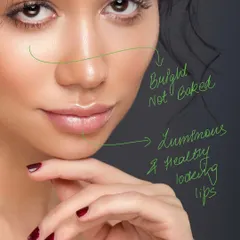
Here is the same image after the basic editing and skin retouching stage. I've cleaned up blemishes and evened out the skin tones, creating a clean base. This step is crucial for a professional and polished portrait headshot.
This is the final, color-graded image. By adjusting the colors and tones, I've added mood and depth, making the portrait pop. Learning color grading is what takes your images from good to great.
About From RAW to Reality: Post-Processing
Most beginners think the camera does all the work, but the real heavy lifting happens in post-processing. When I work on a file, I do not just slap a filter on it. I start by fixing skin tones and cleaning up imperfections, then move to color grading to build a specific mood. Whether you are using Lightroom or Photoshop, the goal is to make the image look natural yet polished. If you want to stop guessing your edits and learn a consistent, professional workflow, we should chat.
Many students come to me asking why their photos look 'dull' compared to the ones they see on Instagram or in magazines. The secret is that what you see in the camera is only the starting point. I break this down into three stages during my workshops:
The Three Stages of My Workflow
- The RAW Base: This is where you establish your exposure and white balance. If you do not nail this in-camera, you are fighting an uphill battle in post.
- Retouching: This is the clean-up phase. We look at frequency separation techniques to smooth skin while keeping the texture real. No plasticky looks here.
- Color Grading: This is where the mood happens. It is not just about making things colorful; it is about guiding the viewer's eye to the subject using complementary tones.
Why Learn This?
Gear gets outdated, but the ability to process light and color stays with you forever. Whether you are aiming for high-end fashion portfolios or clean product photography, your editing workflow is your signature. You can join my specialized retouching courses to get hands-on with my personal workflow and industry-standard tools.
Similar work from other experts
Browse through Curated picks from other experts on mytribe
 10
10
Mastering FPV Post-Production & Video Editing
 10
10Behind the Lens: My Process and Technique


Professional Editing for Your Mobile Photos
Our Process: Behind The Lens
Behind the Scenes: Our Professional Studio Workflow
Behind the Scenes: My Photography Process
More from Photography Education & Workshops by Vipin Gaur
More services by Vipin Gaur