AI & Python Programming
Robotics Cafes
Pricing Guide
Python Foundations & Logic (Small Group)
Core Curriculum
- Fundamentals: Instruction on syntax, data types (integers, strings), variables, and user input methods.
- Logic Building: Detailed breakdown of control structures (If-Else) and loops (For/While) to solve mathematical problems.
- Projects: Guidance to build functional command-line tools like a text calculator or simple quiz game.
Class Experience
- Batch Size: Small cohort (4 to 8 students) ensuring individual attention.
- Language: Instruction in a blend of English and Hindi to ensure concepts are easily grasped.
- Mode: Available as offline classes (AC classroom) or live interactive online sessions.
- Frequency: 8 classes per month, approximately 60 minutes per session.
Tools & Resources
- Setup: Assistance with installing Python and an IDE (VS Code or PyCharm) on personal laptops.
- Practice: access to source code files after every project for revision.
AI Game Control & Computer Vision
Advanced Curriculum
- Library Mastery: Hands-on training with external Python libraries including OpenCV (camera access), MediaPipe (tracking), and CVZone.
- Gesture Control: Building logic to track hand movements and map them to screen coordinates.
- Face Detection: Coding triggers based on facial recognition logic (e.g., LED activation on face detection).
Project Deliverables
- Game Integration: Linking Python code to play external games (like Subway Surfers) without touching the keyboard.
- Real-time Interaction: Creation of 2 to 3 functioning AI projects per month using the webcam.
- Automation: Scripts to automate keyboard or mouse tasks via code.
Technical Skills
- Environment Management: Training on complex library installation and troubleshooting pip errors.
- Math Application: Practical use of X-Y axis coordinate geometry to translate physical motion to digital actions.
Python with Robotics (Hardware Integration)
Hardware-Software Bridge
- Communication: Teaching
pyserialto send data between the Python script and an Arduino board. - Circuit Building: Basics of electronics including breadboards, jumper wires, resistors, and LED polarity.
- Smart Projects: Building prototypes like turning on a physical bulb using hand gestures.
Kit Requirements
- Tuition Scope: Fee covers instruction, coding support, and debugging.
- Hardware: Requires a standard Robotics Kit (Arduino Uno, sensors, breadboard) to be procured separately.
- Component Usage: Instruction on using Ultrasonic/IR sensors, microcontrollers, and actuators.
Mentorship
- Safety: Guidance on handling electronic components safely to prevent short circuits.
- Hybrid Debugging: Support for troubleshooting both the code logic and the physical wiring connections.
1-on-1 Custom Project Mentorship
Customized Learning Path
- Student-Led Projects: Curriculum adapts to build specific student ideas (e.g., custom games or greeting apps).
- Accelerated Learning: Faster pace than group batches, ideal for quick learners or students focusing on CS boards.
Premium Attention
- Direct Access: 100% instructor attention for immediate debugging and deep-dive concept explanation.
- Flexible Scheduling: Ability to adjust class timings based on student exam or school schedules.
- Capstones: Support for building complex, portfolio-worthy projects for school exhibitions.
About AI & Python Programming
Why I Teach Coding
I believe coding is beautiful, especially when you get to see your ideas come alive. My main goal is to help kids discover how fun and creative Python programming can be, not just by reading, but by making real things from day one.
What We'll Actually Build
No boring theory here - we’ll jump right into:
- AI gesture recognition projects, like turning on a light with just a hand wave
- Air calculators you control by pointing in the air
- Face detection apps that light up an LED
- Games where you use your body, not just the keyboard
- Your own Python projects, including practical tools like a text-based calculator
My Approach: Fun, Logic, Practice
Mere saath coding ka matlab hai - masti ke saath seekhna (coding with me means learning with fun). We work on real projects, so you get to build, experiment, and see results fast. The goal is not just to teach Python, but to grow logical thinking and problem-solving skills, all while having fun.
Tech We Explore
We’ll cover beginner computer vision Python tools, play with AI, and even connect your code to real-world things like Arduino boards. Whether you’re new or have tried before, I focus on hands-on learning instead of just talking about code.
Who’s It For?
Ideal for kids and beginners who want to build, create, and play their way into the world of coding. No stress, just lots of practice and plenty of “wow” moments.
Meet your Expert
Robotics Cafes
9 connects in last 3 months
My Story
Kids love playing games, but I always thought, why not make your own? That’s how Robotics Cafes started – not your usual classroom, more like a playground for tech. I still remember, once my students made a surprise 'Happy Birthday' game for me, I just laughed and asked, 'Arre, tum logo ko kaise pata chala?' (How did you all find out?). Watching them build their own Tom and Jerry game, or seeing a robot move for the first time – that’s the real fun. Here, we build confidence, not just code.
My Work
What we teach - We cover creative coding for kids, robotics, Python, AI, 3D printing, Arduino, Scratch, and game/app development.
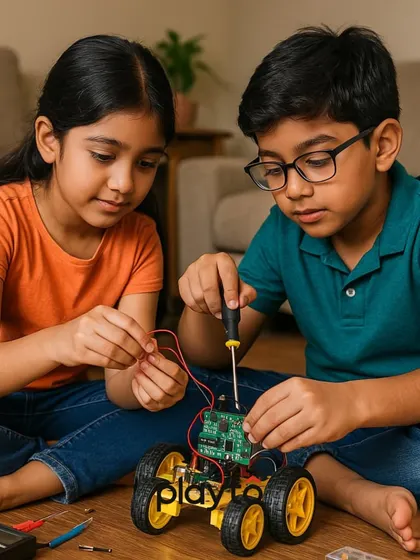
Learn by Doing - No boring theory. You build stuff – like Chota Bheem coding projects and robots that actually move.
Fun First - Classes mix English and Hindi. The goal? Make you love coding, not fear it. It’s really fun.
For Every Kid - Beginners or advanced, all are welcome. Online and Pitampura, Delhi center. Age 6+. Start with basics, go advanced.
Similar to Robotics Cafes
Find more vetted experts
in minutes.