3D Design & Printing in Delhi Ncr
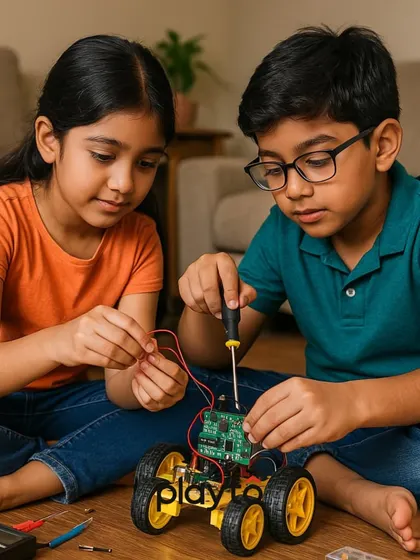
We help kids design their own 3D models, print them, and build working robots using Blender and Arduino, all through hands-on sessions without boring theory.
Pricing Guide
ESTIMATESAbout 3D Design & Printing
Why We Do This
We want kids to actually build stuff, not just talk about it. With 3D printing, kids see how their imagination can turn into something they can hold in their hands. It's pretty cool, aur bachchon ko yeh magic khud dekhne ka mauka milta hai (and kids get to experience this magic themselves).
What Happens in the Sessions
- We jump straight into action - koi boring theory nahi (no boring theory).
- Using Blender 3D tutorials, kids design their own models from scratch, not some copy-paste job.
- Once the design is ready, we watch the 3D printer do its thing. It's wild to see your idea become an actual object, layer by layer.
- The highlight? Building OTTO ROBO. We 3D print robot parts and then use Arduino robot projects to make it dance. Matlab, sirf banana nahi - chalana bhi sikhte hain! (It’s not just about making, we learn to make it move too!)
Why It Matters
This is more than just a fun activity. 3D modeling for kids helps them learn creative thinking, problem-solving, and gives them future-ready skills for students. Jo aaj seekh rahe hain, kal kaam aayega (What they learn today will help them tomorrow).
Good to Know
Perfect for ages 6 and up. Unsure? Come for a trial, maza aayega (it will be fun)!
Highlights
Browse through Robotics Cafes's best work
Meet your Expert
Robotics Cafes
My Story
Kids love playing games, but I always thought, why not make your own? That’s how Robotics Cafes started – not your usual classroom, more like a playground for tech. I still remember, once my students made a surprise 'Happy Birthday' game for me, I just laughed and asked, 'Arre, tum logo ko kaise pata chala?' (How did you all find out?). Watching them build their own Tom and Jerry game, or seeing a robot move for the first time – that’s the real fun. Here, we build confidence, not just code.
My Work
What we teach - We cover creative coding for kids, robotics, Python, AI, 3D printing, Arduino, Scratch, and game/app development.
Learn by Doing - No boring theory. You build stuff – like Chota Bheem coding projects and robots that actually move.
Fun First - Classes mix English and Hindi. The goal? Make you love coding, not fear it. It’s really fun.
For Every Kid - Beginners or advanced, all are welcome. Online and Pitampura, Delhi center. Age 6+. Start with basics, go advanced.