Students' Amazing Creations in Robotics and Coding
From gear-driven machines to autonomous robots, watch our young innovators apply engineering principles and logic to bring their ideas to life.
This student demonstrates his impressive wind-powered stamp machine. He confidently explains the cam mechanism, the 6 by 5 gear ratio, and how he used weights for stability, showcasing a deep understanding of mechanical engineering principles.
Teamwork and creativity on display. These two students present their "Plants and Pollination" project, explaining how they used a motion sensor and gears to make their LEGO bee move and interact with a flower.
Watch as these two students explain how they programmed their EV3 Mindstorms robots. They demonstrate using an ultrasonic sensor to detect an object and execute a U-turn, a fundamental skill in autonomous navigation.
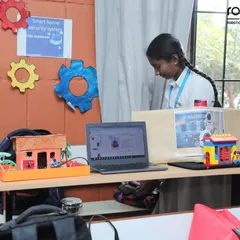
This young creator shows off his "Tree House Camp" model. He explains how he used a color sensor to program the roof to open and close, demonstrating a clear grasp of conditional logic in coding.
This student provides a detailed explanation of different gear systems. He demonstrates the idler gear, gear trains, and gear ratios, explaining how they affect speed and rotation, showcasing advanced mechanical knowledge.
Here, a student clearly explains various gear joints, including basic, downhill, and uphill configurations. He discusses mechanical advantage and how different gear ratios are used in real-world applications like high-speed cars.
This student presents his "Snack Stand" model, which he programmed to move forward and back using a color sensor. It's a great example of how we teach kids to use sensors to control their creations.
Watch this young innovator explain his LEGO windmill and train station. He demonstrates how a light sensor detects the train and how gear joints can be used to change the speed of the windmill, turning it into a fan.
This student explains his EV3 Mindstorm robot, which uses a color sensor to detect light levels. He walks through his code block by block, demonstrating how the robot is programmed to stop when it detects a dark surface.
Even our youngest students build impressive projects. This little engineer proudly presents his model of a pond system for animals, showing how he programmed it to work.
About Our Students' Amazing Creations
When you watch these videos, you aren't just seeing projects; you are seeing core engineering and coding concepts in action. Whether it is a student explaining how gear ratios affect torque or using an ultrasonic sensor to navigate a robot, the focus here is on understanding the 'why' behind the build. Our students move beyond just following instructions to actually programming, debugging, and refining their own autonomous creations.
At ROBO-G, we believe that the best way to master STEAM education is by getting hands dirty. This isn't passive classroom instruction. Every project you see here is an opportunity for a child to move from a blank screen to a functional machine.
The Mechanics of Learning
In these student presentations, you will see a variety of advanced concepts simplified through play:
- Mechanical Engineering: Students use LEGO components to demonstrate gear trains, idler gears, and mechanical advantage. They learn how to translate input power into specific outputs.
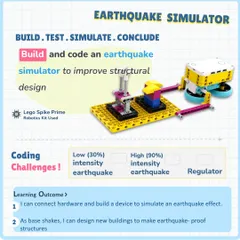
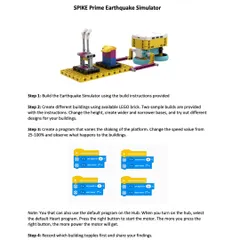
- Computational Thinking: Using tools like LEGO EV3 Mindstorms and Spike Prime, students learn to translate real-world problems into code. They work with sensors—ultrasonic, color, and motion—to give their robots awareness of their surroundings.
- Error Correction: You will notice our students aren't afraid to explain how they fixed a bug or adjusted their logic. We consider debugging a critical skill, teaching children that a failed attempt is just a necessary step toward the final result.
A Different Kind of Classroom
Whether it is a child programming a windmill to generate electricity or using tilt sensors to steer a racing game, they are developing patience and persistence. We keep our batch sizes small to ensure every child gets the hardware access they need. By the time they present their work to parents, they aren't just showing a robot; they are explaining the science behind it. Visit our centers in North Bangalore or Whitefield to see these labs in action and find the right program for your child.
Similar work from other experts
Browse through Curated picks from other experts on mytribe
Featured Student Inventions & STEM Projects
Our Young Innovators in Action
Robotics & Coding Projects Made by Kids
Our Young Innovators in Action
 5
5
Student Robotics Projects and Coding Innovations
Creative STEM Projects and Engineering Models
More from Robotics Camps & Workshops by ROBO-G