Smart Security Guide: How to Use Digital Locks Safely
Owning a digital lock is a great first step, but how you use it matters most. Follow our expert tips to keep your home's entry points truly secure and reliable.
Here are the essential do's and don'ts of digital smart lock security. Your lock is only as strong as the way you use it, so follow these tips to keep your world truly secure.
This graphic provides clear do's and don'ts for your digital lock. We advise updating passcodes regularly and avoiding weak PINs like "123456" to ensure your security is never compromised.
Did you know that keypad locks can be hacked if not used carefully? This is the first in a series of tips to help you make smarter choices for your security.
Tip #1 for smart lock security: Clean your keypad regularly. Wiping away smudges prevents revealing commonly used digits, adding an extra layer of protection.
Tip #2 for smart lock security: Avoid obvious PINs. Skip codes like 1234 or birthdates and use random 4-6 digit combinations to make your lock harder to crack.
Tip #3 for smart lock security: Do not share your PIN digitally. Avoid sending it via call or text. If you need to share it, do so only in person to maintain control.
About Smart Security Guide
A small, practical step often missed is regular keypad maintenance. Oils and smudges on your touchscreen can reveal frequently pressed digits, making your PIN easier to guess for anyone watching. Simply wiping your lock’s panel with a soft, dry microfiber cloth after every few uses prevents these patterns from building up, adding an extra layer of simple, effective security that most people overlook.
Your Digital Lock, Properly Secured
At Harrison, we believe a smart lock is only as strong as the habits surrounding it. After 75 years of securing homes, we know that technology is great, but user awareness is the real shield.
Master Your PIN Hygiene
Avoid the convenience trap of using easy-to-guess codes like '1234', '1111', or your birthdate. When setting your PIN, use random sequences that are not tied to personal information. If you ever suspect that someone has watched you enter your code, or if you feel your security has been compromised, change the PIN immediately.
Digital Privacy for Your Access Codes
In today’s world, it is tempting to share access codes via text or WhatsApp for quick convenience. Avoid this. Digital messages can be intercepted or seen on a locked screen. If you must share access with a guest, maid, or service provider, use the temporary code feature provided in our app, or share it verbally in person.
Physical Maintenance Tips
- Battery Management: Digital locks typically provide low-battery warnings weeks in advance. Do not ignore these alerts. If the battery dies, use the emergency USB-C port to jump-start the lock with a power bank.
- Mechanical Backup: Keep your emergency physical keys in a secure, accessible place outside the house—not inside a locked safe or behind the door you are trying to unlock.
- Weather Protection: While our locks are built for Indian conditions with IP54 resistance, ensuring the area is sheltered from direct, heavy monsoon rain will extend the lifespan of the electronics and the finish.
Similar work from other experts
Browse through Curated picks from other experts on mytribe
 21
21
Smart Locks: Keyless Home Entry and Security Systems
Smart Door Locks: Keyless Entry and Home Security
 4
4
Smart Home Security Advice for Bangalore Homes
Keyless Security Solutions for Modern Homes
 13
13
Smart & Digital Locks
 5
5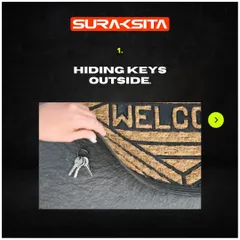


Avoiding Common Home Security Vulnerabilities
More from Smart & Digital Locks by Harrison Locks
More services by Harrison Locks